
We know how important it is to have immediate access to your favourite casino games anywhere you are betninjaa.ca. The Betninja Casino app provides a seamless mobile experience customized for Canadian players, combining lightning-fast load times with a full range of slots, table games, and live dealer action. Regardless of you use an Android smartphone or an iPhone, getting the app on your device takes just a few minutes. In this guide, we will guide you through every step of installing, installing, and making the most of the Betninja Casino mobile app.
How to Install the iOS App on Apple Devices
Getting Straight from the App Store
Installing the Betninja Casino app on an Apple device is easy because it is present directly on the App Store. We hold a verified developer account, so the app satisfies all Apple guidelines for security and privacy. Just open the App Store, search for “Betninja Casino,” and tap the download icon. If you are seeing this on your iPhone, you can also use the direct link from our mobile page, which sends you to the official listing right away.
The app is free to download and does not demand any special configuration. It will appear on your home screen as soon as the installation finishes. We recommend using to Wi‑Fi if you want to avoid using mobile data, although the file size is modest. Once the app is loaded, you can transfer it to a folder or your dock for quick access. The icon displays our distinctive ninja logo, making it easy to spot among your other apps.
Checking Your Apple ID and Permissions
When you launch the app for the first time, you may be prompted to authenticate your Apple ID for the download, especially if you have two‑factor authentication activated. This is a standard Apple security measure and not something we control. After authentication, the app will ask for permission to send you push notifications. We recommend you to permit this so you never lose a deposit match or free spins offer. You can control notification preferences later in the app’s settings panel.
The app also seeks permission to access your device’s location only if you want to use location‑based features, but gaming functionality works flawlessly without it. We do not follow your location in the background. For Face ID or Touch ID, you can turn on biometric login from the account menu. That way, each time you open the app, a quick glance or fingerprint scan gets you directly to the lobby. It is a protected and simple way to safeguard your account.
Financial and Deposit Methods on the Application
Making a Rapid Deposit
We have simplified the deposit process on the mobile app to spare you time. Click the cashier icon, pick “Deposit,” and opt for from a variety of payment methods common with Canadian players, such as Interac e‑Transfer, Visa, Mastercard, MuchBetter, ecoPayz, and select cryptocurrencies. The app instantly recommends the method you used last, so you can redo a transaction with one tap. Minimum deposit amounts are minimal, and funds appear in your account immediately for most options.
- Interac e‑Transfer
- Visa / Mastercard
- MuchBetter
- ecoPayz
- Bitcoin and other cryptocurrencies
We do not apply any deposit fees, and the transaction is protected by the same encryption that guards our desktop site. If you use Interac, you can finalize thestar.com the payment through your banking app without departing the casino interface. For cryptocurrency deposits, the app creates a wallet address and monitors the confirmation on the blockchain. Once the deposit is verified, your balance updates immediately, and you can jump into any game.
Withdrawing Your Winnings
Withdrawing your prizes from the Betninja Casino app is similarly easy. Go to the cashier, choose “Withdraw,” and select your preferred method. We generally process withdrawals returning to the option you used for depositing, but you can introduce alternative options after confirming your identity. The app enables you to save various withdrawal methods for ease. We aim to process requests in under 24 hours, and e‑wallet payouts often land the same day.
Before you submit your first withdrawal, we might ask you to complete a verification check by uploading a photo ID and a latest utility bill. You can do this directly inside the app by taking a picture with your phone’s camera. The documents are sent over a protected channel and checked by our compliance team. Once confirmed, future withdrawals get even faster. You can monitor the state of your cashout in the transaction history, and we send a push notification the instant your funds are on the way.
Transaction History and Security
We believe transparency is key, so the app provides a full transaction history that you can sort by deposits, withdrawals, bonuses, and game rounds. Each entry shows the date, amount, and current status. If a withdrawal is in progress, you can tap it to see an estimated completion time. We also show a running balance graph that helps you keep track of your spending over a week or month. This feature is especially useful for players who use the app’s responsible gaming tools.
All financial data is protected with TLS 1.3 technology, the same standard used by major banks. The app never stores your full card number on the device, and biometric authentication offers another layer of protection. We undergo regular security audits to verify the app remains safe against emerging threats. If you ever notice a transaction you do not recognize, you can lock your account from the settings menu and contact our support team immediately. We are here to help 24/7.
Device Support and System Requirements
Android Requirements
To operate the Betninja Casino app without issues on an Android device, you require a phone or tablet running Android 8.0 or higher. We recommend at least 2 GB of RAM and a reliable internet connection, via Wi‑Fi or mobile data. The app itself is compact, taking up under 100 MB of storage space after installation. Your device should also have a screen resolution of 720p or above to show games without distortion. We test the app on well-known brands like Samsung, Google Pixel, OnePlus, and Xiaomi on a regular basis.
Performance can fluctuate if you have an older device with limited processing power, but we have built the app with an efficient codebase that adjustes to different hardware. Live dealer games, which stream high-definition video, run best on devices with a quad‑core processor. If you ever face lag, terminating background apps and clearing cache usually solves the issue. We also suggest keeping your operating system up to date to the latest version available for your phone.
iOS Specs
For Apple users, the Betninja Casino app is works with iPhones and iPads using iOS 14.0 or later. We fine-tune the app for every screen size, from the compact iPhone SE to the more spacious iPad Pro. The download size is small, and the app works efficiently on devices with the A12 Bionic chip and newer. Face ID and Touch ID are fully enabled, enabling you to authenticate safely without inputting your password each time. We have evaluated the app thoroughly on the latest iOS releases to ensure flawless performance.
While the app functions on older iPhone models like the iPhone 8 and iPhone X, you may see slightly longer load times for graphics‑heavy 3D slots. We recommend keeping at least 1 GB of free storage space for the app and its cache. If you use an iPad, the interface scales beautifully, giving you a bigger game grid and easier access to the cashier. The app automatically conforms to your device’s language and region settings, making it set for Canadian players from the first launch.
Steps to Download the App on Android
Enabling Installations from Unknown Sources
Because the Betninja Casino app is not available through the Google Play Store, you will have to allow installations from unknown sources. We realize this appears technical, but it is a simple one‑time setting. Open your device’s Settings, go to Security or Apps & Notifications, and find Install Unknown Apps or Unknown Sources. Depending on your Android version, you may need to grant permission to your browser or file manager app. We advise turning this permission on only for the download session.
Once the app is installed properly, you can disable the setting again to keep your device secure. Our .apk file is signed with a trusted certificate and does not contain any harmful code. We also scan every release before publishing. If you encounter a warning, simply tap “Install anyway” or “Accept.” After enabling the setting, you are prepared to download the app directly from our official mobile page. We keep the download link prominently displayed on the site.
Sequential Android Installation
- Navigate to the Betninja Casino mobile page on your Android phone using Chrome or any browser.
- Click on the “Download for Android” button to start retrieving the .apk file.
- Launch the downloaded file from your notification bar or the Downloads folder.
- If prompted, confirm that you want to install the application.
- Pause a few seconds while the installation finishes, then tap “Open.”
After the first launch, the app may require permissions such as storage access and notifications. We recommend granting notification access to receive real‑time bonus alerts. The login screen will appear immediately, and you can sign in with your existing Betninja Casino credentials or create a new account. The entire process usually needs less than two minutes on a decent Wi‑Fi connection. Should you face any issues, our support team is available around the clock to help.
Reasons Why Get the Betninja Casino App?
We crafted the Betninja Casino app to offer you the full casino floor right in your hand, without any sacrifice on speed or quality. The native app loads more quickly than a mobile browser and uses less data once installed|after installation. We send push notifications for exclusive promotions, new game releases, and tournament reminders, so you never miss a beat the instant a bonus launches. You can also toggle between landscape and portrait mode on most games, making one-handed play incredibly comfortable.
When you load the app, you unlock the same massive game library found on our desktop site, including hundreds of slots, live dealer tables, and instant-win games. The interface is tailored for touchscreens, with larger buttons and swipe-friendly menus that minimize accidental taps. We also offer biometric login on supported devices, so you can head directly into the lobby with a fingerprint or face scan. From quicker deposits to smoother gameplay, the app truly elevates your mobile sessions.
Setting up Your Account Through the Mobile App
If you are a newcomer to Betninja Casino, we have simplified the registration process on the mobile app as straightforward as possible. Tap the “Join Now” or “Sign Up” button on the welcome screen, and you will be guided through a short form. We ask for essential details such as your name, email address, date of birth, and a secure password. The entire form adapts to your phone’s keyboard, so you can finish it in under two minutes. We also send a verification email to confirm your address.
Canadian players can opt to register with their preferred currency, and we accept CAD by default. Once your account is activated, you can proceed straight to the cashier to make your first deposit. We advise completing the identity verification process early by uploading a piece of government‑issued ID. This step grants higher withdrawal limits and ensures faster payouts later. The app’s secure document upload feature lets you snap a photo of your ID directly from your phone’s camera.
Exploring the App Interface: Essential Features
Home Screen and Lobby Structure
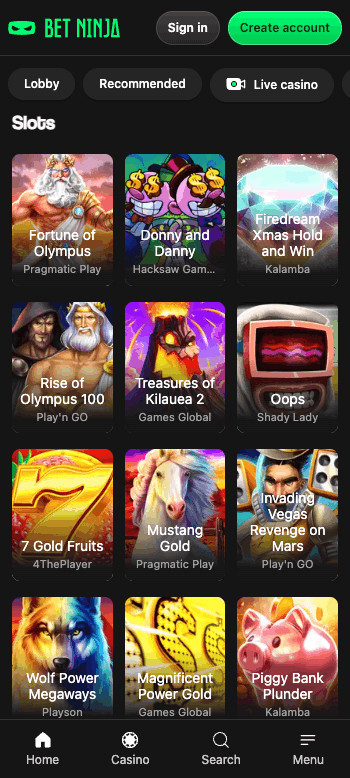
We organized the home screen to put the most important sections right at your fingertips. At the top, you will see a rotating banner featuring current promotions, new game launches, and jackpot totals. Just below that, we added quick‑link tiles for slots, live casino, table games, and instant wins. The bottom navigation bar remains fixed, giving you one‑tap access to the lobby, promotions, cashier, and your account. We minimized clutter so you can find what you need without scrolling endlessly.
The lobby also features a smart search bar that anticipates game titles as you type. If you like browsing, you can swipe horizontally through curated game collections such as “New Releases,” “Megaways,” or “High RTP Slots.” The layout adapts automatically to your screen width, whether you use your phone vertically or horizontally. We also included a night mode toggle that softens the interface for late‑night play, reducing eye strain while maintaining the games vibrant.
Game Sections and Search Filters
We know that every player has unique tastes, so we built a powerful filtering system into the app. You can sort games by provider, volatility, theme, or payline structure. For instance, if you love high‑volatility slots with an adventure theme, you can apply those filters instantly. The app also stores your favourite games and places them in a “Recently Played” section for quick access. This feature is very handy when you want to resume a session with a single tap.
Live dealer games are organized under a dedicated tab, with tables for blackjack, roulette, baccarat, and game shows. We stream these in full HD from professional studios, and the app lets you adjust the video quality to match your connection speed. You can also narrow by betting limits to find a table that fits your bankroll. The game grid appears quickly, and each thumbnail presents a mini preview when you long‑press it, giving you a glimpse of the action before you commit.
Controlling Your Wallet and Settings
Your complete account management can be managed from the app’s wallet and settings menu. The cashier section displays your real funds balance, bonus balance, and any pending withdrawals in one view. We added a transaction history page where you can filter by date, amount, or payment method. From the settings menu, you can configure deposit limits, take a break, or turn on two‑factor authentication. We believe responsible gaming tools should be as available as the games themselves.
You can also change your personal details, change your password, and customize notification preferences without leaving the app. Push notifications can be tailored so you only receive alerts for the types of promotions you prefer. If you ever need help, the live chat icon is located in the bottom corner of the settings screen, putting you in touch to a support agent in under a minute. The entire interface is designed to be intuitive, even for beginner mobile casino users.
Special Mobile Bonuses and Promotions
Introductory Offer for App Users
We offer players who get the Betninja Casino app with a substantial welcome package that often includes a deposit match and free spins on selected slots. The offer is initiated automatically after your first qualifying deposit, and you can check the progress bar in the promotions tab. We guarantee the wagering requirements are clearly displayed, so you continually know how close you are to converting bonus funds into real cash. The welcome bonus is accessible exclusively to new players who sign up through the app.
To get the full package, you could need to make multiple deposits. Each tier releases additional match bonuses and a fresh batch of free spins. We deliver a push notification as soon as the next tier becomes accessible, along with a direct link to the cashier. The bonus funds are deposited immediately, and you can start playing with them immediately. Just keep in mind to opt in where required, as some promotions demand a manual activation tap on the banner.
Regular Mobile Reloads and Free Spins
Beyond the welcome offer, we host weekly reload bonuses that are tailored particularly for mobile players. Every Wednesday, for example, you could find a 50% deposit match up to a certain amount, plus a handful of free spins on a featured game. We also organize app‑only tournaments where you can ascend the leaderboard by playing chosen slots and win cash prizes. These events are highlighted on the home screen banner, making them difficult to miss.
Free spins offers commonly come with no wagering requirements on the winnings, which means what you win is belongs to you to keep or withdraw. We send push alerts a few hours before a reload bonus runs out, so you can determine whether to participate. The loyalty program is fully integrated into the app, and you accumulate points for every real‑money bet you place. Those points can be swapped for bonus credits, giving you even more value as you game on your phone.
Popular Queries
Is the Betninja Casino app free to download?
Indeed, the app is entirely free to download on both Android and iOS devices. We do not charge any upfront fees or subscription costs. You only need to fund your account if you wish to play for real money. The app itself does not contain any hidden purchases, and you can explore the game lobby in demo mode even before making a deposit. We encourage you to try the platform before committing any funds.
Can I access my account on both desktop and mobile?
Certainly. Your Betninja Casino account works seamlessly across all platforms. Any deposit, bonus, or gameplay progress you accumulate on the app is instantly reflected when you log in on a desktop browser. A unified wallet system ensures your balance and transaction history stay synchronized. So you can start playing on your phone during your commute and continue on your computer at home seamlessly.
How should I proceed if the app does not install?
If you experience installation issues on Android, first ensure that the “Install from unknown sources” permission is enabled for your browser. Also, verify that you have enough free storage space and that the downloaded .apk file is not damaged. Deleting the file and downloading it again often resolves the problem. On iOS, verify you are running iOS 14.0 or later and that you have agreed to the App Store terms. If the problem persists, our live chat team can help you en.wikipedia.org through troubleshooting steps.
Are all games accessible on the mobile app?
We have adapted the vast majority of our game library for mobile play. Slots, table games, and live dealer tables are completely available, and we include new mobile‑compatible titles every week. The only exceptions might be a handful of older desktop games that depend on Flash technology, which we are gradually phasing out. You can easily identify mobile‑ready games by the phone icon on their thumbnail. If a game is not available on the app, it will be visibly marked.
By what method do I upgrade the app to the latest version?
For Android, we publish updates straight on our mobile page. When a new version is available, the app will display a notification inviting you to download and install the update. Simply click the link, download the new .apk, and install it over the existing version. Your data and settings will stay intact. On iOS, updates are processed through the App Store just like any other app. Turn on automatic updates to ensure you always have the latest features and security patches.
Is it secure to play for real money on the app?
Yes, playing for real money on the Betninja Casino app is totally safe. We are a regulated and regulated operator, and the app uses banking‑grade encryption to safeguard your personal and financial data. All games are independently tested for fairness by certified auditors. Biometric login adds an extra layer of security, and we under no circumstances share your information with third parties. Our responsible gaming tools let you to set limits, take breaks, or self‑exclude directly from the app, providing you full control over your play.