
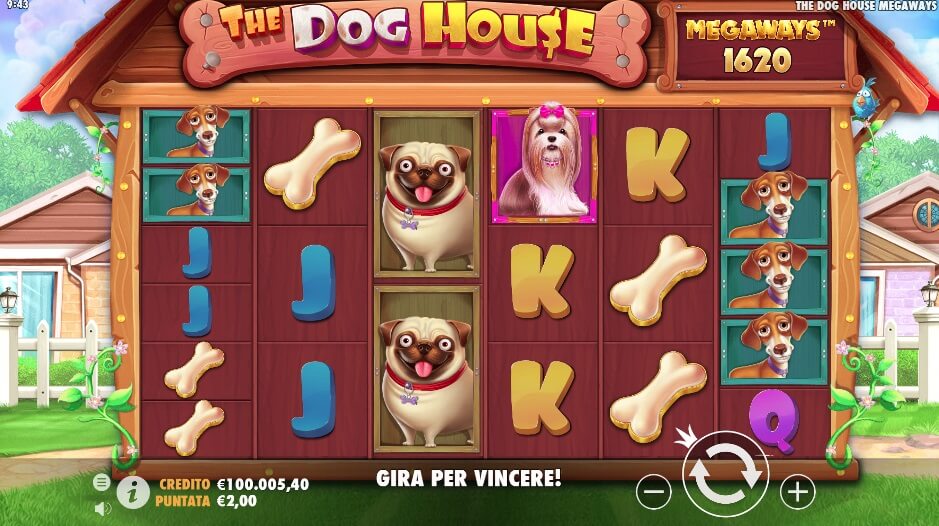

For Canadian slot fans, The Dog House Megaways is more than a game about hunting prizes https://megawaydemo.com/the-dog-house-megaways. Sure, it’s a hit from Pragmatic Play, packed with a energetic theme and lucrative bonus rounds. But what really lets you make it your own is the range of personal settings it offers. Getting to know these options enables you to build a gaming session that feels comfortable, controlled, and adapted just for you. You can change the game’s pace, control your spending, and adjust the sensory details. This guide covers every setting you can tweak in The Dog House Megaways. It’s meant to help players from Vancouver to Halifax set up the game to fit their personal style and preferences.
Getting to know the Game Interface and Essential Controls
Let’s begin: you need to know your way around the game screen. The Dog House Megaways presents a cheerful, cartoon backyard with a doghouse, where the reels are the main event. Surrounding them, you’ll find control panels and info displays designed to be simple, for both newcomers and veterans. The big spin button is your primary control. Adjacent, you’ll see buttons for autoplay, setting your bet, and opening the paytable. Most casinos will let you see all values in Canadian Dollars (CAD), so you always know clearly what you’re betting and what you could win, with no mental currency conversion needed.
Other displays show your current bet level, total bet amount, and remaining cash balance. A gear or menu icon usually hides the quick settings menu, which is your path to deeper personalization. This layout is identical on desktop in Ontario or mobile in British Columbia alike. Becoming familiar with this interface is step one. It lets you easily find the settings that change game speed, sound, and visuals. A player who feels in command knows how to spin the reels and how to tailor the entire game environment to suit their goals for that session.
Audio and Visual Customization Settings
The visual and audio design of a slot game greatly affects the fun. The Dog House Megaways gives you plenty of levers to pull here. You can adjust the audio-visual experience to match your surroundings, a helpful feature if you’re in a shared space or just want a more immersive quiet night in.
Audio and Music Settings
You get independent control of the game’s music and its sound effects. That lively, happy soundtrack can be switched on or off, and its volume controlled with a slider. The same goes for the spin noises, win jingles, and special feature sounds like the Free Spins announcement. This is great if you’d rather listen to your own playlist or a podcast while you play. It’s also key for playing discreetly without bothering roommates or family. A one-click mute option is often right on the main panel. These audio controls let you choose if the game’s sounds are the star of the show or just background ambiance.
Visual Quality and Animation Settings
On the visual side, you might find options for animation speed and graphic quality, particularly when playing on different gadgets. Some versions let you accelerate the reel spin animations and win celebrations for a quicker pace. Also, on mobile devices, you may have the choice to lower graphic quality. This ensures gameplay smooth and can reduce data use, a practical point for Canadians playing on mobile networks. These small visual adjustments ensure the game runs well whether you’re on a powerful gaming PC or an older smartphone. The vibrant graphics of the barking dogs and the dynamic Megaways reels stay clear and engaging, without any stutters or lag.
Wager Setup and Wager Management
Handling your bet is one of the most important ways to customize any slot session. The Dog House Megaways offers versatile tools for this. Users in Canada can handle their bankroll methodically, using the game’s own controls to set limits that promote responsible play. The main tool is the bet level selector. It adjusts the coin value, which in turn changes your total bet per spin. You typically adjust it with easy plus and minus buttons. The total bet is displayed clearly, indicating the exact amount in dollars that will be staked on the next spin. There’s no guesswork before you act.
Besides physical adjustments, the game often has a ‘bet max’ button. This selects the highest possible stake for one spin, which also qualifies you for the biggest potential wins. But the real adjustment power often lies in the autoplay settings. Here, you can predefine a number of spins to run without intervention at a fixed bet level. More sophisticated wager management might include configuring loss limits or single win limits inside the autoplay menu. This allows you to define well-defined boundaries for your session. Using these features means players from Alberta to Nova Scotia can engage with the game in a way that matches their financial comfort. It converts betting from a repetitive chore into a planned part of your strategy.
Automatic spin Features and Advanced Spin Settings
The autoplay function is a key part of modern slot customization, and The Dog House Megaways implements it with several well-considered options. This function isn’t just about convenience. It’s about offering you authority over an programmed process. When you bring up the autoplay menu, you can select how many spins you want to run automatically. Common choices span from 10 to 100 spins, or sometimes an unlimited option. The crucial part is the stop conditions. These options turn autoplay from a passive tool into an proactive management system. Savvy players use them to secure their bankroll and secure wins.
Establishing Stop Conditions for Autoplay
Important conditions include stopping autoplay if any particular win goes above a set amount. You can also define a stop if your total profits during the autoplay session reach a certain limit. On the other side, you can set a loss limit. This will cease autoplay if your bankroll falls by a predetermined amount since you began the feature. Another popular condition is to stop when a bonus game activates. This ensures you’re always present for the exciting Free Spins round. For Canadian players, these settings are essential to a structured approach. They allow you experience longer play without constantly tapping the screen, all while adhering to your own clear rules for when to take a break and think things over.
Speed and Effectiveness During Autoplay

While autoplay is in progress, you can typically control the spin speed. You might select faster rotations to hurry things along, or slower ones to maintain some of the timeless slot anticipation. Some game versions also offer a ‘skip screen’ option for minor wins. This allows the game move immediately to the next spin if a payout is below a amount you define. Collectively, these configurable stop conditions and speed settings turn autoplay a very personal engine. You can adjust it for a short session on your travel or a more extended, hands-off evening of fun at home.
Game Rules and Info Availability
Tailoring your experience also means being aware of the game inside and out. The Dog House Megaways offers a deep well of information, which you reach through the paytable or an ‘i’ information button. This isn’t a traditional setting you adjust, but understanding this info lets you personalize your entire strategy. The paytable displays the value of each symbol. It describes the unique Megaways mechanic, where the number of symbols on each reel shifts with every spin. It also presents the full rules for the sought-after Free Spins bonus and its sticky multiplier wilds. For players in Canada, having this data at your fingertips eliminates the mystery out of the game’s volatility and potential.
The rules section typically states the game’s Return to Player (RTP) percentage, a theoretical long-term average. It also describes the bonus buy feature, if it’s available in your area. In some Canadian provinces, you might see this option, letting you pay to jump straight into the Free Spins round. Knowing the cost and odds of this feature is a vital part of planning your approach. By spending a few minutes in the information section, you transition from playing on instinct to playing with knowledge. That is the deepest form of personal control. You can set realistic expectations based on the game’s high volatility and adapt your bet sizes and session length to match.
Mobile versus Desktop Experience Customization
The gadget you use to experience The Dog House Megaways alters how you get to and use its customization options. The core features are the same, but their layout and some finer details can vary between desktop and mobile. This adjustment makes sense for how we utilize each device. Canadians often move between platforms, so noticing these differences helps you obtain the most out of the game, no matter how you opt to play.
Improving for Mobile Play
On phones and tablets, the game interface is simplified for a smaller touchscreen. Buttons are larger and spaced out for easy tapping. The settings menu is often placed into a single hamburger menu icon to save space. Customization here focuses on usability. You’ll find quick mute buttons, simplified bet sliders, and autoplay settings built for easy finger navigation. Performance settings, like lowering graphic quality for smoother play or less data use, are more common on mobile versions. This consideration means players across Canada can have a good experience on the go, whether using an iPhone in Toronto or an Android in Calgary, without running their battery down too fast or going through a data plan.
Taking Advantage of Desktop Capabilities
The desktop version, played in a browser or casino app, usually gives you a wider view of the game and sometimes more detailed control panels. With the precision of a mouse, it can be easier to set exact bet amounts or click through multiple settings screens. The larger screen also means info displays and control buttons can be out in the open, so you don’t need to open and close menus as much. For players who like to multitask, or perhaps record their gameplay, the desktop offers the stability and screen space to customize your whole digital workspace, not just the game window. This flexibility ensures every player can find their ideal setup for hanging out with the playful pups of The Dog House Megaways.
Responsible Gaming Tools and Individual Boundaries
The most significant personal settings often reside outside the game itself. They are the responsible gaming tools offered by authorized online casinos. While not built into the slot software, these tools are crucial for establishing a long-lasting, rewarding habit over the extended period. Trustworthy casinos in Canada offer deposit caps, loss limits, wager limits, and session time limits. You establish these within your casino account, and they extend to all games you play, including The Dog House Megaways. They are a effective way to commit to a budget for your money and your time before the rush of the game even begins.
You can also commonly find reality check alerts and detailed activity statements through your casino profile. Using these tools signifies the ultimate level of personal control. It’s a preventive step to oversee your gaming habits. Players across the board, from Quebec to Manitoba, would do well to learn about these account-level controls and set limits that correspond to their entertainment budget. When you combine these casino tools with the in-game autoplay stops and bet management, you build a complete framework for responsible play. This comprehensive approach to customization preserves the fun of chasing big wins with those sticky multiplier wilds just that: fun. It helps ensure the game remains a constructive part of a balanced life.